Simulation And Modeling Theory
Definition of Simulation
Simulation is the imitation of the operation of a real-world system over time using a model.
Definition of Model
A model is a mathematical or logical representation of a real-world system used to understand, analyze, or predict its behavior.
Difference Between Simulation and Model
| Model | Simulation |
|---|---|
| A model is a representation of a real system. | Simulation is the process of using a model to study system behavior. |
| It can be mathematical, logical, or physical. | It is an experimental technique performed on the model. |
| A model is static or conceptual. | Simulation is dynamic and runs over time. |
| Example: A traffic system diagram. | Example: Running traffic flow analysis using the diagram. |
Computer Simulation Models & Steps
Steps in a Simulation Study
1. Problem Formulation
Define exactly what you are trying to solve. You can’t build a model if you don’t know the goal (e.g., “Why is the bank line so long on Mondays?”).
2. Model Construction
Creating a logical representation of the system. This is the “blueprint” stage where you decide which parts of the real world are important to include.
3. Data Collection
Gathering real-world information to feed into the model. If you’re simulating a bank, you need to know exactly how many people arrive per hour.
4. Model Programming
Translating your blueprint into computer code. This is where you use software (like Python, MATLAB, or Arena) to make the model “live.”
5. Validation
Crucial Step: Checking if the model actually matches reality. If your model says the bank line is 2 miles long but in real life it’s 5 people, your model is broken.
6. Design of Experiment
Deciding what “What If” scenarios you want to test. For example: “What if we add a third cashier?” or “What if we close an hour early?”
7. Simulation Run and Analysis
Running the code and looking at the results. You collect the data generated by the computer to see which scenario worked best.
8. Documentation
Writing down how the model was built and what the results were. This ensures that someone else can understand your work later.
9. Implementation
Taking the best solution from the simulation and applying it to the real world.
System Simulation & Model Types
is the process of creating a model of a real system and testing its behavior using a computer.
Every system simulation is a simulation, but not every simulation qualifies as a system simulation.
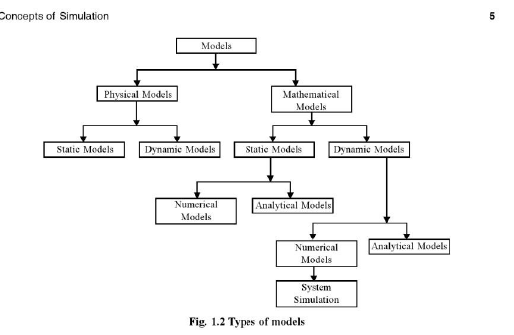
Types of Simulation Models
| Model Type | Description | Example |
|---|---|---|
| Static Model | Does not change with time | Monte Carlo simulation |
| Dynamic Model | Changes over time | Weather simulation |
| Deterministic/Analytical Model | No randomness involved | Simple mathematical equation |
| Stochastic/Numerical Model | Includes randomness and probability | Stock market simulation |
| Continuous Model | Variables change continuously | Water flow system |
| Discrete Model | Changes occur at specific events/times | Bank queue simulation |
Advantages & Applied Areas of simulation
Advantages
- Safety: Test dangerous scenarios (like flight simulations) without risk.
- Cost-Effective: It is cheaper to simulate any real entity.
- Time Compression: You can simulate 10 years of a business plan in 10 seconds.
- Improves decision making
- Helps analyze complex systems
- Useful in engineering, business, healthcare, and science
- Saves time and money
- Understand system performance
- Predict future behavior
- Reduce risk and cost
- Test different situations safely
Applied Areas
- Manufacturing: Planning assembly lines.
- Healthcare: Modeling virus spread or hospital bed capacity.
- Military: War games and strategic planning.
- Transportation: Traffic light timing and airport logistics.
Real-Time Simulation
refers to a model where the computer simulation runs at the same rate as the actual wall-clock time. If an event takes 5 seconds in reality, it must take 5 seconds in the simulation.
This is critical for Hardware-in-the-loop (HIL) testing, where a simulation interacts with real physical hardware.
Verification vs. Validation (The Iterative Process)
This is an iterative loop because you often find errors that force you back to the modeling stage.
Steps
- Requirements Analysis
- Design Verification
- Development & Coding
- Testing and Validation
- Feedback and Improvement
- Repeat until system works correctly
Verification vs Validation
| Verification | Validation |
|---|---|
| Checks whether the system is built correctly | Checks whether the correct system is built |
| Focuses on process and design | Focuses on user needs and requirements |
| Done during development | Done after or during testing |
| Answers: “Are we building the product right?” | Answers: “Are we building the right product?” |
| Includes reviews, inspections, and code checking | Includes testing with real users and requirements |
Simple Example
- Verification: Checking if the software follows design specifications.
- Validation: Checking if the software actually solves the user’s problem.
Critical Path
is the longest sequence of activities in a project network that determines the minimum completion time of the entire project.If any activity on the critical path is delayed, the whole project will also be delayed.
Benefits of Using Simulation of PERT (Program Evaluation and Review Technique) and CPM (Critical Path Method) in Large Software Projects
1. Better Project Planning
PERT and CPM help divide a large software project into smaller activities and organize them systematically.
2. Accurate Time Estimation
PERT uses probabilistic time estimation to predict project completion time more realistically.
3. Identification of Critical Activities
CPM identifies the critical path, helping managers focus on the most important tasks.
4. Efficient Resource Management
Simulation helps allocate developers, budget, and resources effectively.
5. Risk Analysis
Different project scenarios can be simulated to analyze risks and uncertainties before implementation.
6. Improved Scheduling and Control
Managers can monitor project progress, detect delays early, and take corrective actions.
7. Cost and Time Reduction
Proper planning and scheduling reduce unnecessary delays and project costs.
8. Better Decision Making
Simulation provides useful project data for making informed management decisions.