Raspberry Pi- 4

“Vicente, want to see how we can make an app from these concepts?”

That simple question sparked something special. Today we were studying combinations in his math book. Instead of just working through the exercises, I thought—why not bring these ideas to life with code?
Recognition Letter

The app

This is pin website

Recognition Letter

The app

This is pin Leaf website

Recognition Letter

The app

What followed was a father-son journey, transforming abstract math into something interactive and fun! We built an app that visualizes combinations as colorful trees, letting Vicente see patterns grow in real time.
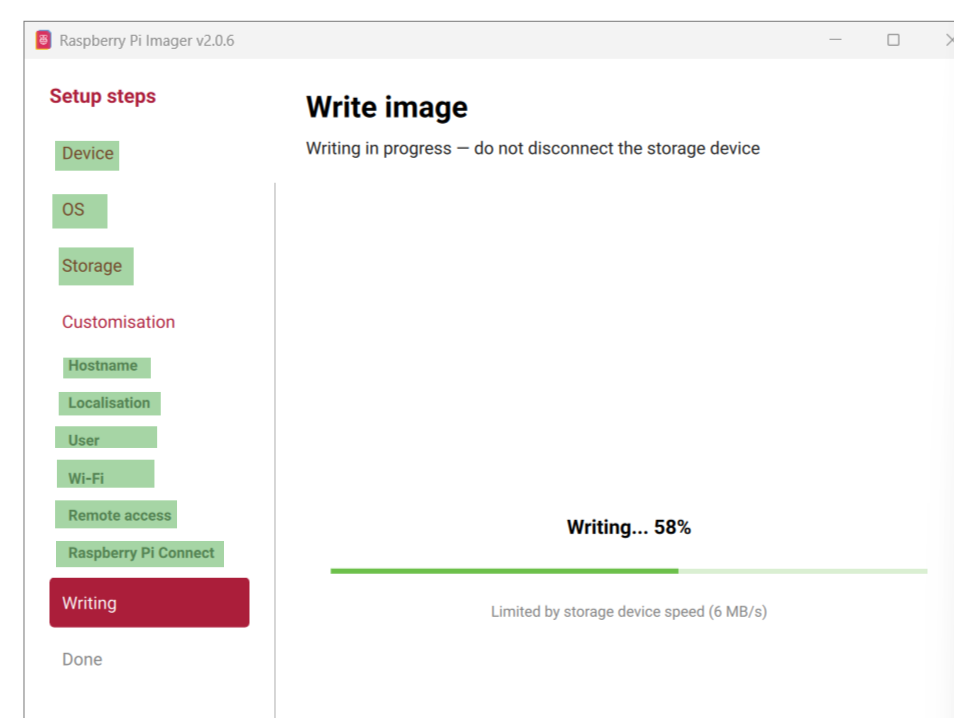
Raspberry pi setup in raspberry pi image

Recognition Letter

This image is highlite setup steps


āĻŦ⧁āϟ (Boot) āϕ⧀? āϏāĻšāϜ āĻŦā§āϝāĻžāĻ–ā§āϝāĻž

āϏāĻšāϜ āĻ•āĻĨāĻžā§Ÿ, Boot (āĻŦ⧁āϟ) āĻŽāĻžāύ⧇ āĻšāϞ⧋ āĻ•āĻŽā§āĻĒāĻŋāωāϟāĻžāϰ āĻŦāĻž āĻ˛ā§āϝāĻžāĻĒāϟāĻĒ āϚāĻžāϞ⧁ āĻšāĻ“ā§ŸāĻžāϰ āĻĒā§āϰāĻ•ā§āϰāĻŋ⧟āĻžāĨ¤ āϝāĻ–āύ āφāĻĒāύāĻŋ āĻĒāĻžāĻ“ā§ŸāĻžāϰ āĻŦāĻžāϟāύ āϚāĻžāĻĒ⧇āύ, āϤāĻ–āύ āĻĨ⧇āϕ⧇ āĻļ⧁āϰ⧁ āĻ•āϰ⧇ āĻ¸ā§āĻ•ā§āϰāĻŋāύ⧇ ‘Windows’ āĻŦāĻž ‘Desktop’ āφāϏāĻž āĻĒāĻ°ā§āϝāĻ¨ā§āϤ āĻ•āĻŽā§āĻĒāĻŋāωāϟāĻžāϰ āϭ⧇āϤāϰ⧇ āϝ⧇ āĻ•āĻžāϜāϗ⧁āϞ⧋ āĻ•āϰ⧇, āϤāĻžāϕ⧇āχ Booting āĻŦāϞāĻž āĻšā§ŸāĨ¤

āĻŦ⧁āϟ āϕ⧇āύ āĻĒā§āĻ°ā§Ÿā§‹āϜāύ?

āĻ•āĻŽā§āĻĒāĻŋāωāϟāĻžāϰ⧇āϰ āĻĒā§āϰāϧāĻžāύ āĻŽā§‡āĻŽā§‹āϰāĻŋ āĻŦāĻž RAM āĻĨāĻžāϕ⧇ āĻ…āĻ¸ā§āĻĨāĻžāϝāĻŧā§€ (Volatile)āĨ¤ āĻ…āĻ°ā§āĻĨāĻžā§Ž, āĻ•āĻŽā§āĻĒāĻŋāωāϟāĻžāϰ āĻŦāĻ¨ā§āϧ āĻ•āϰāϞ⧇ āĻ°â€ā§āϝāĻžāĻŽ āϏāĻŽā§āĻĒā§‚āĻ°ā§āĻŖ āĻ–āĻžāϞāĻŋ āĻšā§Ÿā§‡ āϝāĻžā§ŸāĨ¤ āϤāĻžāχ āĻ•āĻŽā§āĻĒāĻŋāωāϟāĻžāϰ āϚāĻžāϞ⧁ āĻ•āϰāĻžāϰ āϏāĻŽā§Ÿ āϤāĻžāϕ⧇ āύāϤ⧁āύ āĻ•āϰ⧇ āĻļ⧇āĻ–āĻžāϤ⧇ āĻšā§Ÿ āϕ⧀āĻ­āĻžāĻŦ⧇ āĻ•āĻžāϜ āĻ•āϰāϤ⧇ āĻšāĻŦ⧇āĨ¤ āĻāχ ‘āĻļ⧇āĻ–āĻžāύ⧋āϰ’ āĻŦāĻž āĻ…āĻĒāĻžāϰ⧇āϟāĻŋāĻ‚ āϏāĻŋāĻ¸ā§āĻŸā§‡āĻŽāϕ⧇ (OS) āĻšāĻžāĻ°ā§āĻĄāĻĄāĻŋāĻ¸ā§āĻ• āĻĨ⧇āϕ⧇ āĻ°â€ā§āϝāĻžāĻŽā§‡ āφāύāĻžāϰ āĻĒā§āϰāĻ•ā§āϰāĻŋāϝāĻŧāĻžāχ āĻšāϞ⧋ āĻŦ⧁āϟāĨ¤


āĻŦ⧁āϟ āĻšāĻ“ā§ŸāĻžāϰ āϧāĻžāĻĒāϗ⧁āϞ⧋ (Steps of Booting):

  1. POST (Power-On Self-Test): āĻŦāĻžāϟāύ āϚāĻžāĻĒāĻžāϰ āϏāĻžāĻĨ⧇ āϏāĻžāĻĨ⧇ āĻŦāĻŋāĻĻā§āĻ¯ā§ā§Ž āĻĒā§āϰāĻŦāĻžāĻšāĻŋāϤ āĻšā§Ÿ āĻāĻŦāĻ‚ BIOS āĻšā§‡āĻ• āĻ•āϰ⧇ āĻĻ⧇āϖ⧇ āϝ⧇ āĻ°â€ā§āϝāĻžāĻŽ, āϕ⧀-āĻŦā§‹āĻ°ā§āĻĄ āĻŦāĻž āĻĒā§āϰāϏ⧇āϏāϰ āĻ āĻŋāĻ•āĻŽāϤ⧋ āĻ•āĻžāϜ āĻ•āϰāϛ⧇ āĻ•āĻŋ āύāĻžāĨ¤
  2. Loading BIOS: āĻŽāĻžāĻĻāĻžāϰāĻŦā§‹āĻ°ā§āĻĄā§‡āϰ āĻāĻ•āϟāĻŋ āϚāĻŋāĻĒ (ROM) āĻĨ⧇āϕ⧇ āĻĒā§āϰāĻžāĻĨāĻŽāĻŋāĻ• āύāĻŋāĻ°ā§āĻĻ⧇āĻļāĻžāĻŦāϞ⧀ āϞ⧋āĻĄ āĻšā§ŸāĨ¤
  3. Boot Loader: āĻāϰāĻĒāϰ āĻ•āĻŽā§āĻĒāĻŋāωāϟāĻžāϰ āϤāĻžāϰ āĻŽā§‡āĻŽā§‹āϰāĻŋ (SSD/HDD) āĻĨ⧇āϕ⧇ Boot Loader āύāĻžāĻŽāĻ• āĻāĻ•āϟāĻŋ āϛ⧋āϟ āĻĒā§āϰ⧋āĻ—ā§āϰāĻžāĻŽ āϖ⧁āρāĻœā§‡ āĻŦ⧇āϰ āĻ•āϰ⧇āĨ¤ āĻāϰ āĻ•āĻžāϜ āĻšāϞ⧋ āĻ…āĻĒāĻžāϰ⧇āϟāĻŋāĻ‚ āϏāĻŋāĻ¸ā§āĻŸā§‡āĻŽāϕ⧇ (āϝ⧇āĻŽāύ: Windows āĻŦāĻž Linux) āϖ⧁āρāĻœā§‡ āĻŦ⧇āϰ āĻ•āϰāĻžāĨ¤
  4. OS Initialization: āϏāĻŦāĻļ⧇āώ⧇ āĻ…āĻĒāĻžāϰ⧇āϟāĻŋāĻ‚ āϏāĻŋāĻ¸ā§āĻŸā§‡āĻŽ āĻ°â€ā§āϝāĻžāĻŽā§‡ āϞ⧋āĻĄ āĻšā§Ÿ āĻāĻŦāĻ‚ āφāĻĒāύāĻŋ āĻ¸ā§āĻ•ā§āϰāĻŋāύ⧇ āφāĻĒāύāĻžāϰ āĻĄā§‡āĻ•ā§āϏāϟāĻĒ āĻĻ⧇āĻ–āϤ⧇ āĻĒāĻžāύāĨ¤

āĻŦ⧁āϟāĻŋāĻ‚-āĻāϰ āĻĒā§āϰāĻ•āĻžāϰāϭ⧇āĻĻ:

  • Cold Boot (āϕ⧋āĻ˛ā§āĻĄ āĻŦ⧁āϟ): āĻ•āĻŽā§āĻĒāĻŋāωāϟāĻžāϰ āĻĒ⧁āϰ⧋āĻĒ⧁āϰāĻŋ āĻŦāĻ¨ā§āϧ āĻĨāĻžāĻ•āĻž āĻ…āĻŦāĻ¸ā§āĻĨāĻžā§Ÿ āĻŦāĻžāϟāύ āĻšā§‡āĻĒ⧇ āϚāĻžāϞ⧁ āĻ•āϰāĻžāϕ⧇ āϕ⧋āĻ˛ā§āĻĄ āĻŦ⧁āϟ āĻŦāϞ⧇āĨ¤
  • Warm Boot (āĻ“āϝāĻŧāĻžāĻ°ā§āĻŽ āĻŦ⧁āϟ): āĻ•āĻŽā§āĻĒāĻŋāωāϟāĻžāϰ āϚāĻžāϞ⧁ āĻĨāĻžāĻ•āĻž āĻ…āĻŦāĻ¸ā§āĻĨāĻžā§Ÿ ‘Restart’ āĻĻ⧇āĻ“ā§ŸāĻžāϕ⧇ āĻ“ā§ŸāĻžāĻ°ā§āĻŽ āĻŦ⧁āϟ āĻŦāϞ⧇āĨ¤ āĻāϤ⧇ āĻšāĻžāĻ°ā§āĻĄāĻ“ā§Ÿā§āϝāĻžāϰ āύāϤ⧁āύ āĻ•āϰ⧇ āĻšā§‡āĻ• āĻ•āϰāĻžāϰ āĻĒā§āĻ°ā§Ÿā§‹āϜāύ āĻšā§Ÿ āύāĻž, āϤāĻžāχ āĻāϟāĻŋ āĻĻā§āϰ⧁āϤ āĻšā§ŸāĨ¤

1. Core Setup Steps

  • Device: Select your specific Raspberry Pi model (e.g., Raspberry Pi 5 or Raspberry Pi 4). This ensures the software matches your hardware architecture.
  • OS (Operating System): Choose the “brain” of your Pi.
    • Example: Raspberry Pi OS for general use or RetroPie for gaming.
  • Storage: Select the microSD card or USB drive where you want to install (flash) the OS.

2. Customisation (Pre-Settings)

These settings allow you to configure the Pi before you even turn it on for the first time, making the first boot seamless.

Hostname

  • Definition: A unique name for your Pi on the local network.
  • Real-time Example: Naming it mypi.local. Instead of memorizing a complex IP address (like 192.168.1.15), you can just type this name in your browser or terminal to find it.

Localisation

  • Definition: Sets your Time Zone, Keyboard Layout, and Country.
  • Real-time Example: Setting the time to your local city so logs are accurate, and ensuring your keyboard keys (like @ or #) work correctly when you type.

User

  • Definition: Creating a unique Username and Password for security.
  • Real-time Example: * Username: rahul_pi
    • Password: Ami@Pi2024
  • How it works: When you turn on the Pi, a login box appears. You must enter these specific credentials to reach the desktop or command line.

Wi-Fi

  • Definition: Pre-saving your Home Wi-Fi SSID (name) and Password into the OS.
  • Real-time Example: The moment you plug in your Pi, it connects to the internet automatically. You don’t need to plug in a spare keyboard just to type in a Wi-Fi password.

3. Remote Access Methods

FeatureRemote Access SSH (Secure Shell)Raspberry Pi Connect
LocationUsually from the same Wi-Fi network.From anywhere in the world (via internet).
MethodText-based. You type commands in a terminal window.Visual. You see the full desktop and use your mouse.
Best Use CaseFor quick updates or changing system files.When you need to see the screen or use GUI apps remotely.

Raspberry Pi Remote Access Guide

When your Raspberry Pi is used without a dedicated monitor, keyboard, or mouse, it is called “Headless Mode.” Remote access allows you to control the device from another computer or mobile device.


1. Local Network Control (Same Wi-Fi)

If your Pi and your laptop are on the same Wi-Fi network, you can use these two methods:

SSH (Secure Shell)

  • Purpose: Provides access to the Pi’s Terminal (Command Line).
  • Experience: Running ssh rasp1@192.168.1.x is SSH. It is very fast and efficient for text-based tasks.
if host is not identified

ssh-keygen -R 192.168.1.x

VNC (Virtual Network Computing)

  • Purpose: Allows you to see and interact with the full Desktop screen.
  • Experience: Tools like TigerVNC or RealVNC use this. It lets you use your mouse to click icons and open windows.
āĻ–. āĻ•āĻŽāĻžāĻ¨ā§āĻĄ āϞāĻžāχāύ⧇āϰ āĻŽāĻžāĻ§ā§āϝāĻŽā§‡ (Terminal āĻŦā§āϝāĻŦāĻšāĻžāϰ āĻ•āϰ⧇)
ā§§. āϟāĻžāĻ°ā§āĻŽāĻŋāύāĻžāϞ⧇ āϞāĻŋāϖ⧁āύ: sudo raspi-config
⧍. Interface Options-āĻ āĻ—āĻŋā§Ÿā§‡ Enter āϚāĻžāĻĒ⧁āύāĨ¤
ā§Š. VNC āϏāĻŋāϞ⧇āĻ•ā§āϟ āĻ•āϰ⧇ Enter āϚāĻžāĻĒ⧁āύāĨ¤
ā§Ē. "Would you like the VNC Server to be enabled?" āĻĒā§āϰāĻļā§āύ āφāϏāϞ⧇ Yes āϏāĻŋāϞ⧇āĻ•ā§āϟ āĻ•āϰ⧁āύāĨ¤
ā§Ģ. āĻ•āĻžāϜ āĻļ⧇āώ āĻšāϞ⧇ Esc āĻšā§‡āĻĒ⧇ āĻŦ⧇āϰ āĻšā§Ÿā§‡ āφāϏ⧁āύāĨ¤

VNC āϕ⧀ āĻāĻŦāĻ‚ āĻāϟāĻŋ āϕ⧀āĻ­āĻžāĻŦ⧇ āĻ•āĻžāϜ āĻ•āϰ⧇?

āϝāĻ–āύ āφāĻĒāύāĻžāϰ āĻĄāĻŋāĻ­āĻžāχāϏ⧇āϰ āϏāĻžāĻŽāύ⧇ āϏāĻļāϰ⧀āϰ⧇ āĻŦāϏ⧇ āĻ•āĻžāϜ āĻ•āϰāĻž āϏāĻŽā§āĻ­āĻŦ āĻšā§Ÿ āύāĻž, āϤāĻ–āύ VNC āĻŦā§āϝāĻŦāĻšāĻžāϰ āĻ•āϰāĻž āĻšā§ŸāĨ¤ āĻāϰ āĻĻ⧁āϟāĻŋ āĻ…āĻ‚āĻļ āĻĨāĻžāϕ⧇:

Server (āϏāĻžāĻ°ā§āĻ­āĻžāϰ): āĻāϟāĻŋ āφāĻĒāύāĻžāϰ Raspberry Pi-āϤ⧇ āϚāϞ⧇āĨ¤

Client (āĻ•ā§āϞāĻžāϝāĻŧ⧇āĻ¨ā§āϟ): āĻāϟāĻŋ āφāĻĒāύāĻžāϰ āĻ˛ā§āϝāĻžāĻĒāϟāĻĒ, āĻŸā§āϝāĻžāĻŦāϞ⧇āϟ āĻŦāĻž āĻĢā§‹āύ⧇ āϚāϞ⧇āĨ¤

SSH (Command Prompt): āĻāϟāĻŋ āĻšāϞ⧋ āϟāĻŋāĻ­āĻŋāϰ āĻĒāĻžāĻ“ā§ŸāĻžāϰ āĻŦāĻžāϟāύāĨ¤ āĻāϟāĻŋ āĻ›āĻžā§œāĻž āϟāĻŋāĻ­āĻŋ āϚāĻžāϞ⧁ āĻšāĻŦ⧇ āύāĻžāĨ¤

TigerVNC: āĻāϟāĻŋ āĻšāϞ⧋ āϟāĻŋāĻ­āĻŋāϰ āĻ¸ā§āĻ•ā§āϰāĻŋāύāĨ¤ āϟāĻŋāĻ­āĻŋ āϚāĻžāϞ⧁ āĻšāĻ“ā§ŸāĻžāϰ āĻĒāϰāχ āϕ⧇āĻŦāϞ āĻ¸ā§āĻ•ā§āϰāĻŋāύ⧇ āĻ›āĻŦāĻŋ āĻĻ⧇āĻ–āĻž āϝāĻžāĻŦ⧇āĨ¤


2. Connect_Raspberry_Pi_Com

To control your Pi when you are away from home (on a different network):

  • Raspberry Pi Connect: The easiest and most secure way. Just log in via a browser to see your screen.
  • VPN: Creates a secure “tunnel” to your home network so you can access the Pi as if you were there.

āϰāĻžāϏāĻŦ⧇āϰāĻŋ āĻĒāĻžāχ-āϕ⧇ (Raspberry Pi) āύ⧇āϟāĻ“ā§ŸāĻžāĻ°ā§āĻ• āĻŦāĻž āφāĻĒāύāĻžāϰ āĻ•āĻŽā§āĻĒāĻŋāωāϟāĻžāϰ⧇āϰ āϏāĻžāĻĨ⧇ āĻ•āĻžāύ⧇āĻ•ā§āϟ āĻ•āϰāĻžāϰ āĻŦ⧇āĻļ āĻ•ā§Ÿā§‡āĻ•āϟāĻŋ āϜāύāĻĒā§āϰāĻŋ⧟ āĻĒāĻĻā§āϧāϤāĻŋ āĻ°ā§Ÿā§‡āϛ⧇āĨ¤ āφāĻĒāύāĻžāϰ āĻĒā§āĻ°ā§Ÿā§‹āϜāύ āĻ…āύ⧁āϝāĻžā§Ÿā§€ āφāĻĒāύāĻŋ āϝ⧇āϕ⧋āύ⧋ āĻāĻ•āϟāĻŋ āĻŦ⧇āϛ⧇ āύāĻŋāϤ⧇ āĻĒāĻžāϰ⧇āύ:

3. āĻŽā§‹āĻŦāĻžāχāϞ āĻŦāĻž āĻ˛ā§āϝāĻžāĻĒāϟāĻĒ āĻšāϟāĻ¸ā§āĻĒāϟ (Wi-Fi Hotspot)

āĻāϟāĻŋ āĻŦāĻ°ā§āϤāĻŽāĻžāύ⧇ āϏāĻŦāĻšā§‡ā§Ÿā§‡ āϜāύāĻĒā§āϰāĻŋ⧟ āĻĒāĻĻā§āϧāϤāĻŋ, āĻ•āĻžāϰāĻŖ āĻāϤ⧇ āϕ⧋āύ⧋ āϤāĻžāϰ⧇āϰ āĻĒā§āĻ°ā§Ÿā§‹āϜāύ āĻšā§Ÿ āύāĻžāĨ¤

  • āĻ•āĻŋāĻ­āĻžāĻŦ⧇ āĻ•āĻžāϜ āĻ•āϰ⧇: āφāĻĒāύāĻžāϰ āĻ˛ā§āϝāĻžāĻĒāϟāĻĒ āĻŦāĻž āĻĢā§‹āύ⧇āϰ āĻšāϟāĻ¸ā§āĻĒāϟ āĻ…āύ āĻ•āϰ⧇ āĻĒāĻžāχ-āϕ⧇ āϤāĻžāϰ āϏāĻžāĻĨ⧇ āĻ•āĻžāύ⧇āĻ•ā§āϟ āĻ•āϰāĻž āĻšā§ŸāĨ¤
  • āϏ⧁āĻŦāĻŋāϧāĻž: āĻĒāĻžāχ āχāĻ¨ā§āϟāĻžāϰāύ⧇āĻŸā§‡āϰ āϏāĻžāĻĨ⧇ āϝ⧁āĻ•ā§āϤ āĻĨāĻžāϕ⧇ āĻāĻŦāĻ‚ āφāĻĒāύāĻŋ āĻĢā§‹āύ āĻŦāĻž āĻ˛ā§āϝāĻžāĻĒāϟāĻĒ āĻĨ⧇āϕ⧇ āĻāϟāĻŋ āύāĻŋ⧟āĻ¨ā§āĻ¤ā§āϰāĻŖ āĻ•āϰāϤ⧇ āĻĒāĻžāϰ⧇āύāĨ¤

4. āχāĻĨāĻžāϰāύ⧇āϟ āĻ•ā§āϝāĻžāĻŦāϞ (Direct Ethernet / ICS)

āφāĻĒāύāĻŋ āϏāϰāĻžāϏāϰāĻŋ āĻāĻ•āϟāĻŋ āχāĻĨāĻžāϰāύ⧇āϟ āĻ•ā§āϝāĻžāĻŦāϞ āĻĻāĻŋā§Ÿā§‡ āĻĒāĻžāχ-āϕ⧇ āφāĻĒāύāĻžāϰ āĻ˛ā§āϝāĻžāĻĒāϟāĻĒ āĻŦāĻž āϰāĻžāωāϟāĻžāϰ⧇āϰ āϏāĻžāĻĨ⧇ āϝ⧁āĻ•ā§āϤ āĻ•āϰāϤ⧇ āĻĒāĻžāϰ⧇āύāĨ¤

  • āĻ˛ā§āϝāĻžāĻĒāϟāĻĒ⧇āϰ āϏāĻžāĻĨ⧇: āĻāϕ⧇ “Internet Connection Sharing” āĻŦāĻž ICS āĻŦāϞ⧇ (āϝāĻž āφāĻŽāϰāĻž āφāϗ⧇ āφāϞ⧋āϚāύāĻž āĻ•āϰ⧇āĻ›āĻŋ)āĨ¤
  • āϰāĻžāωāϟāĻžāϰ⧇āϰ āϏāĻžāĻĨ⧇: āĻāϟāĻŋ āϏāĻŦāĻšā§‡ā§Ÿā§‡ āĻ¸ā§āĻĨāĻŋāϤāĻŋāĻļā§€āϞ (Stable) āĻĒāĻĻā§āϧāϤāĻŋāĨ¤ āϝāĻžāϰāĻž āĻĒā§āϰāĻĢ⧇āĻļāύāĻžāϞ āĻ•āĻžāϜ āĻ•āϰ⧇āύ āϤāĻžāϰāĻž āĻāϟāĻŋ āĻŦ⧇āĻļāĻŋ āĻŦā§āϝāĻŦāĻšāĻžāϰ āĻ•āϰ⧇āύāĨ¤

5. āĻ“ā§ŸāĻžāχāĻĢāĻžāχ āϰāĻžāωāϟāĻžāϰ (Local Wi-Fi)

āφāĻĒāύāĻžāϰ āĻŦāĻžā§œāĻŋāϤ⧇ āϝāĻĻāĻŋ āĻāĻ•āϟāĻŋ āĻ“ā§ŸāĻžāχāĻĢāĻžāχ āϰāĻžāωāϟāĻžāϰ āĻĨāĻžāϕ⧇, āϤāĻŦ⧇ āĻĒāĻžāχ āϏāϰāĻžāϏāϰāĻŋ āϏ⧇āχ āϰāĻžāωāϟāĻžāϰ⧇āϰ āϏāĻžāĻĨ⧇ āĻ•āĻžāύ⧇āĻ•ā§āϟ āĻšāϤ⧇ āĻĒāĻžāϰ⧇āĨ¤

  • āϏ⧁āĻŦāĻŋāϧāĻž: āĻāĻ•āχ āϰāĻžāωāϟāĻžāϰ⧇ āĻĨāĻžāĻ•āĻž āϏāĻŦ āĻĄāĻŋāĻ­āĻžāχāϏ āĻĨ⧇āϕ⧇ āĻĒāĻžāχ-āϕ⧇ āĻ…ā§āϝāĻžāĻ•ā§āϏ⧇āϏ āĻ•āϰāĻž āϝāĻžā§ŸāĨ¤

  • āĻŦā§āϝāĻŦāĻšāĻžāϰ: āϏāĻžāϧāĻžāϰāĻŖāϤ āϖ⧁āĻŦ āϛ⧋āϟ āĻĄā§‡āϟāĻž āĻŦāĻž āϏ⧇āĻ¨ā§āϏāϰ āϰāĻŋāĻĄāĻŋāĻ‚ āĻĒāĻžāĻ āĻžāύ⧋āϰ āϜāĻ¨ā§āϝ āĻāϟāĻŋ āĻŦā§āϝāĻŦāĻšā§ƒāϤ āĻšā§ŸāĨ¤

6. āχāωāĻāϏāĻŦāĻŋ āϟāĻŋāĻĨāĻžāϰāĻŋāĻ‚ (USB Tethering)

āφāĻĒāύāĻžāϰ āĻĢā§‹āύ⧇āϰ āχāĻ¨ā§āϟāĻžāϰāύ⧇āϟ āϏāϰāĻžāϏāϰāĻŋ āχāωāĻāϏāĻŦāĻŋ āĻ•ā§āϝāĻžāĻŦāϞ āĻĻāĻŋā§Ÿā§‡ āĻĒāĻžāχ-āϤ⧇ āĻļā§‡ā§ŸāĻžāϰ āĻ•āϰāĻž āϝāĻžā§ŸāĨ¤

  • āĻ•āĻŋāĻ­āĻžāĻŦ⧇: āĻĢā§‹āύāϟāĻŋ āχāωāĻāϏāĻŦāĻŋ āĻĻāĻŋā§Ÿā§‡ āĻĒāĻžāχ-āĻāϰ āϏāĻžāĻĨ⧇ āϝ⧁āĻ•ā§āϤ āĻ•āϰ⧇ āĻĢā§‹āύ⧇āϰ āϏ⧇āϟāĻŋāĻ‚āϏ⧇ āĻ—āĻŋā§Ÿā§‡ “USB Tethering” āĻ…āύ āĻ•āϰāϤ⧇ āĻšā§ŸāĨ¤ āĻĒāĻžāχ āĻāϟāĻŋāϕ⧇ āĻāĻ•āϟāĻŋ āχāĻĨāĻžāϰāύ⧇āϟ āĻ•āĻžāύ⧇āĻ•āĻļāύ āĻšāĻŋāϏ⧇āĻŦ⧇ āϧāϰ⧇ āĻ¨ā§‡ā§ŸāĨ¤

7. āϏāĻŋāϰāĻŋ⧟āĻžāϞ āĻ•āĻžāύ⧇āĻ•āĻļāύ (UART / Serial Console)

āϝāĻĻāĻŋ āφāĻĒāύāĻžāϰ āĻ•āĻžāϛ⧇ āĻŽāύāĻŋāϟāϰ āĻŦāĻž āύ⧇āϟāĻ“ā§ŸāĻžāĻ°ā§āĻ• āĻ•āĻŋāϛ⧁āχ āύāĻž āĻĨāĻžāϕ⧇, āϤāĻŦ⧇ USB-to-TTL āĻ…ā§āϝāĻžāĻĄāĻžāĻĒā§āϟāĻžāϰ⧇āϰ āĻŽāĻžāĻ§ā§āϝāĻŽā§‡ āĻĒāĻžāχ-āĻāϰ GPIO āĻĒāĻŋāύ āĻŦā§āϝāĻŦāĻšāĻžāϰ āĻ•āϰ⧇ āϏāϰāĻžāϏāϰāĻŋ āϟāĻžāĻ°ā§āĻŽāĻŋāύāĻžāϞ⧇ āĻĸā§‹āĻ•āĻž āϝāĻžā§ŸāĨ¤

  • āĻŦā§āϝāĻŦāĻšāĻžāϰ: āϝāĻ–āύ āĻĒāĻžāχ-āĻāϰ āύ⧇āϟāĻ“ā§ŸāĻžāĻ°ā§āĻ• āϏ⧇āϟāĻŋāĻ‚āϏ āύāĻˇā§āϟ āĻšā§Ÿā§‡ āϝāĻžā§Ÿ, āϤāĻ–āύ āĻāϟāĻŋ āĻĻāĻŋā§Ÿā§‡ āĻ āĻŋāĻ• āĻ•āϰāĻž āĻšā§ŸāĨ¤

8. āĻšā§‡āĻĄāϞ⧇āϏ āϏ⧇āϟāĻžāφāĻĒ (Headless Setup)

āĻāϏāĻĄāĻŋ āĻ•āĻžāĻ°ā§āĻĄā§‡ āĻ…āĻĒāĻžāϰ⧇āϟāĻŋāĻ‚ āϏāĻŋāĻ¸ā§āĻŸā§‡āĻŽ āϰāĻžāχāϟ āĻ•āϰāĻžāϰ āϏāĻŽā§Ÿ “Raspberry Pi Imager”-āĻ āĻ“ā§ŸāĻžāχāĻĢāĻžāχ āĻāĻŦāĻ‚ āĻāϏāĻāϏāĻāχāϚ (SSH) āϏ⧇āϟāĻŋāĻ‚āϏ āφāϗ⧇ āĻĨ⧇āϕ⧇āχ āϞāĻŋāϖ⧇ āĻĻ⧇āĻ“ā§ŸāĻž āϝāĻžā§ŸāĨ¤ āĻāϤ⧇ āĻĒāĻžāχ āĻĒā§āϰāĻĨāĻŽāĻŦāĻžāϰ āϚāĻžāϞ⧁ āĻ•āϰāĻžāϰ āϏāĻžāĻĨ⧇ āϏāĻžāĻĨ⧇āχ āĻ¸ā§āĻŦ⧟āĻ‚āĻ•ā§āϰāĻŋ⧟āĻ­āĻžāĻŦ⧇ āφāĻĒāύāĻžāϰ āĻĒāϰāĻŋāϚāĻŋāϤ āύ⧇āϟāĻ“ā§ŸāĻžāĻ°ā§āϕ⧇ āĻ•āĻžāύ⧇āĻ•ā§āϟ āĻšā§Ÿā§‡ āϝāĻžā§ŸāĨ¤


9. File Sharing (Transferring Data)

Sometimes you don’t need to see the screen; you just need to move files between your laptop and the Pi.

  • SCP (Secure Copy): Uses the SSH protocol to securely move files via the terminal.
  • Samba: Makes your Raspberry Pi folders appear as a Network Drive in your Windows File Explorer (under “This PC”).

ā§§. SCP (Secure Copy Protocol) āϕ⧀? SCP āĻšāϞ⧋ SSH-āĻāϰ āĻŽāĻžāĻ§ā§āϝāĻŽā§‡ āĻĢāĻžāχāϞ āĻ•āĻĒāĻŋ āĻ•āϰāĻžāϰ āĻāĻ•āϟāĻŋ āύāĻŋāϰāĻžāĻĒāĻĻ āĻĒāĻĻā§āϧāϤāĻŋāĨ¤ āĻāϰ āĻŽāĻžāĻ§ā§āϝāĻŽā§‡ āφāĻĒāύāĻŋ āφāĻĒāύāĻžāϰ āĻ•āĻŽā§āĻĒāĻŋāωāϟāĻžāϰ āĻĨ⧇āϕ⧇ Raspberry Pi-āϤ⧇ āĻŦāĻž Raspberry Pi āĻĨ⧇āϕ⧇ āĻ•āĻŽā§āĻĒāĻŋāωāϟāĻžāϰ⧇ āĻĢāĻžāχāϞ āĻĒāĻžāĻ āĻžāϤ⧇ āĻĒāĻžāϰ⧇āύāĨ¤

Raspberry Pi-āϤ⧇ āĻĢāĻžāχāϞ āĻĒāĻžāĻ āĻžāύ⧋ (Upload) āφāĻĒāύāĻžāϰ āĻ•āĻŽā§āĻĒāĻŋāωāϟāĻžāϰ⧇āϰ āϕ⧋āύ⧋ āĻĢāĻžāχāϞ (āϝ⧇āĻŽāύ: myfile.txt) Raspberry Pi-āϤ⧇ āĻĒāĻžāĻ āĻžāϤ⧇ āĻāχ āĻ•āĻŽāĻžāĻ¨ā§āĻĄāϟāĻŋ āĻŦā§āϝāĻŦāĻšāĻžāϰ āĻ•āϰ⧁āύ:

Bash scp myfile.txt @<pi_ip_address>: āύāĻŋāĻ°ā§āĻĻāĻŋāĻˇā§āϟ āĻĢā§‹āĻ˛ā§āĻĄāĻžāϰ⧇ āĻĒāĻžāĻ āĻžāϤ⧇: āϕ⧋āϞāύ (:) āĻāϰ āĻĒāϰ⧇ āĻĢā§‹āĻ˛ā§āĻĄāĻžāϰ⧇āϰ āύāĻžāĻŽ āϞāĻŋāϖ⧁āύāĨ¤ (āϝ⧇āĻŽāύ: :project/)

Raspberry Pi āĻĨ⧇āϕ⧇ āĻĢāĻžāχāϞ āφāύāĻž (Download) Pi āĻĨ⧇āϕ⧇ āϕ⧋āύ⧋ āĻĢāĻžāχāϞ āφāĻĒāύāĻžāϰ āĻ•āĻŽā§āĻĒāĻŋāωāϟāĻžāϰ⧇āϰ āĻŦāĻ°ā§āϤāĻŽāĻžāύ āĻĄāĻŋāϰ⧇āĻ•ā§āϟāϰāĻŋāϤ⧇ āφāύāϤ⧇ āϚāĻžāχāϞ⧇:

Bash scp @<pi_ip_address>:myfile.txt . (āĻļ⧇āώ⧇ āĻāĻ•āϟāĻŋ āĻĄāϟ . āĻŽāĻžāύ⧇ āĻšāϞ⧋ āĻŦāĻ°ā§āϤāĻŽāĻžāύ āĻĢā§‹āĻ˛ā§āĻĄāĻžāϰ)

āĻāĻ•āĻžāϧāĻŋāĻ• āĻĢāĻžāχāϞ āĻŦāĻž āĻĢā§‹āĻ˛ā§āĻĄāĻžāϰ āĻ•āĻĒāĻŋ āĻ•āϰāĻž āĻāĻ•āĻžāϧāĻŋāĻ• āĻĢāĻžāχāϞ: āĻĢāĻžāχāϞāϗ⧁āϞ⧋āϰ āύāĻžāĻŽ āĻ¸ā§āĻĒ⧇āϏ āĻĻāĻŋā§Ÿā§‡ āϞāĻŋāϖ⧁āύ: scp file1.txt file2.txt @:

āĻ“āϝāĻŧāĻžāχāĻ˛ā§āĻĄāĻ•āĻžāĻ°ā§āĻĄ āĻŦā§āϝāĻŦāĻšāĻžāϰ: āϏāĻŦ āĻŸā§‡āĻ•ā§āϏāϟ āĻĢāĻžāχāϞ āĻĒāĻžāĻ āĻžāϤ⧇: scp *.txt @:

āĻĢā§‹āĻ˛ā§āĻĄāĻžāϰ āĻ•āĻĒāĻŋ āĻ•āϰāĻž: āĻĒ⧁āϰ⧋ āĻāĻ•āϟāĻŋ āĻĢā§‹āĻ˛ā§āĻĄāĻžāϰ āĻāĻŦāĻ‚ āϤāĻžāϰ āϭ⧇āϤāϰ⧇āϰ āϏāĻŦ āĻĢāĻžāχāϞ āĻ•āĻĒāĻŋ āĻ•āϰāϤ⧇ -r (recursive) āĻĢā§āĻ˛ā§āϝāĻžāĻ— āĻŦā§āϝāĻŦāĻšāĻžāϰ āĻ•āϰ⧁āύ: scp -r project/ @:

To see IP address in your device

hostname -I

or 

nmcli device show  

system update

sudo apt update && sudo apt upgrade -y

See temprature

vcgencmd measure_temp

Ram or memory chack

free -h

SSH logout

exit

4. Remote Access Summary Table

ServiceInterfaceNetworkMain Advantage
SSHCommand LineLocalFast and lightweight
VNCFull DesktopLocalGraphical interface (GUI)
Pi ConnectBrowser ScreenInternetAccess from anywhere
SambaFolders/DrivesLocalEasy drag-and-drop files

Troubleshooting VNC Access on Raspberry Pi

If you can access your Pi via SSH (as rasp1@192.168.1.7) but TigerVNC fails, follow these steps to fix it.


1. The Reason for Failure

Modern Raspberry Pi OS versions use Wayland instead of the old X11 display system. Traditional VNC servers (like TigerVNC or RealVNC) often struggle with Wayland’s security layers.


2. Step-by-Step Fix (Via SSH)

Since you are already logged in as rasp1, run these commands in your terminal:

A. Enable the VNC Server

  1. Type: sudo raspi-config
  2. Navigate to: 3 Interface Options
  3. Select: I1 VNC
  4. Choose: Yes to enable it.

B. Switch to X11 (For better TigerVNC Compatibility)

If TigerVNC still won’t connect, you might need to switch the display backend back to X11:

  1. In sudo raspi-config, go to: 6 Advanced Options
  2. Select: A6 Wayland
  3. Choose: W1 X11 (Legacy).
  4. Select Finish and let the Pi Reboot.

3. Connecting via TigerVNC(Virtual Network Computing)

Once the Pi reboots, open TigerVNC on your Windows PC:

  • VNC Server: 192.168.1.7 (or 192.168.1.7:5900)
  • Username: rasp1
  • Password: Use the password you created (e.g., Ami@Pi2024)

4. Alternative: WayVNC

If you want to stay on Wayland (the faster, newer system), TigerVNC might not be the best tool. You should use a VNC viewer that supports WayVNC.

Tip: If all else fails, try Raspberry Pi Connect. It works through your web browser and bypasses all VNC setup headaches!
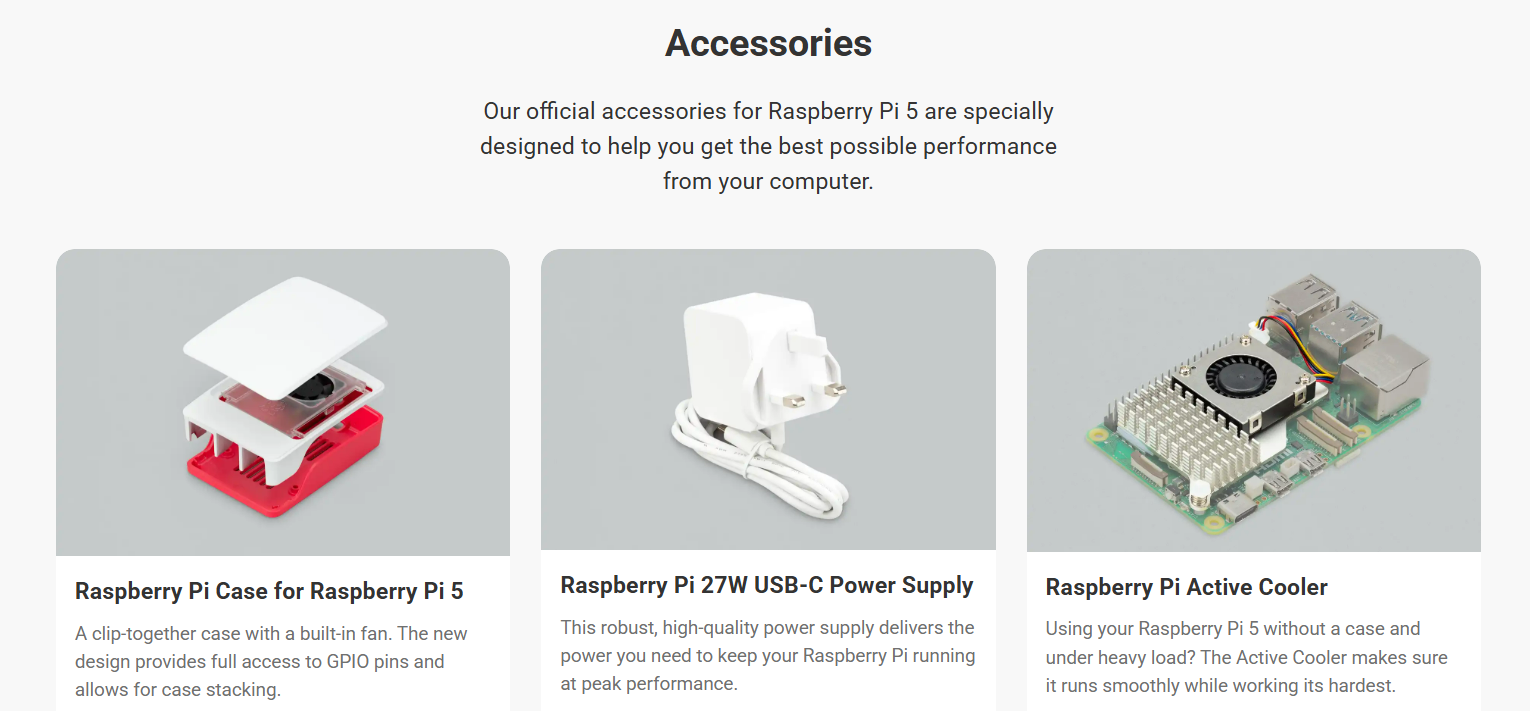

Accessories of Raspberry pi

  1. Raspberry pi case , USB power supply and Active cooler
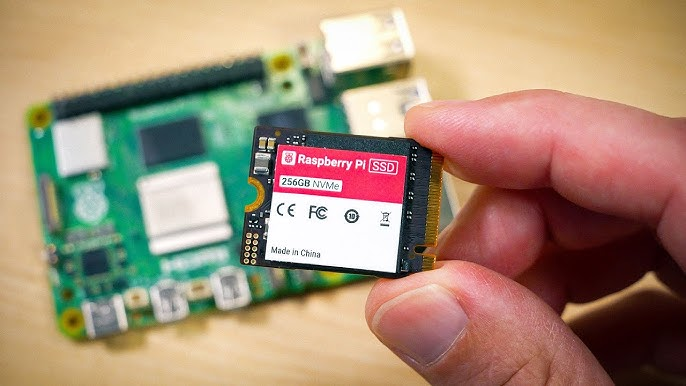
    Recognition Letter

    Raspberry pi case , USB power supply and Active cooler


  1. A 256GB Raspberry Pi SSD
Recognition Letter

I think Raspberry Pi made their own SSD (specifically 2230) because of Pi6. when they release Pi6 with nvme slot (which they should have done with Pi 5) they can easily bundle it and sell more, essentially redirecting the profits to their own pockets instead of other storage manufacturers.

Question & Answer

Question-1 VNC āĻŽāĻžāĻā§‡ āĻŽāĻžāĻā§‡ āĻĄāĻŋāϏāĻ•āĻžāύ⧇āĻ•ā§āϟ āĻšāĻ“ā§ŸāĻžāϰ āĻ•āĻžāϰāĻŖ (VNC Not Connected)

  1. VNC āϏāĻ‚āϝ⧋āĻ— āĻŦāĻŋāĻšā§āĻ›āĻŋāĻ¨ā§āύ āĻšāĻ“ā§ŸāĻžāϰ āĻĒ⧇āĻ›āύ⧇ āĻĒā§āϰāϧāĻžāύāϤ āϤāĻŋāύāϟāĻŋ āĻ•āĻžāϰāĻŖ āĻĨāĻžāϕ⧇:
  • āύ⧇āϟāĻ“ā§ŸāĻžāĻ°ā§āĻ• āĻ¸ā§āĻŸā§āϝāĻžāĻŦāĻŋāϞāĻŋāϟāĻŋ: āϝāĻĻāĻŋ āφāĻĒāύāĻžāϰ āχāĻĨāĻžāϰāύ⧇āϟ āĻŦāĻž āĻ“ā§ŸāĻžāχāĻĢāĻžāχ āϏāĻ‚āϝ⧋āĻ— ā§§ā§Ļ āĻŽāĻŋāύāĻŋāϟ āĻĒāϰ āĻĒāϰ āĻ›ā§‡ā§œā§‡ āĻĻā§‡ā§Ÿ (āϝāĻž āφāĻĒāύāĻŋ āφāϗ⧇ āωāĻ˛ā§āϞ⧇āĻ– āĻ•āϰ⧇āϛ⧇āύ), āϤāĻŦ⧇ VNC āϏāĻžāĻĨ⧇ āϏāĻžāĻĨ⧇āχ āĻŦāĻ¨ā§āϧ āĻšā§Ÿā§‡ āϝāĻžāĻŦ⧇āĨ¤
  • āĻ¸ā§āϞāĻŋāĻĒ āĻŽā§‹āĻĄ āĻŦāĻž āĻ¸ā§āĻ•ā§āϰāĻŋāύ āĻŦā§āĻ˛ā§āϝāĻžāĻ™ā§āĻ•āĻŋāĻ‚: āϰāĻžāϏāĻŦ⧇āϰāĻŋ āĻĒāĻžāχ āϝāĻĻāĻŋ “Screen Blanking” āĻŽā§‹āĻĄā§‡ āϚāϞ⧇ āϝāĻžā§Ÿ, āϤāĻŦ⧇ āĻ…āύ⧇āĻ• āϏāĻŽā§Ÿ VNC āϏ⧇āĻļāύ āĻĒāϜ āĻšā§Ÿā§‡ āϝāĻžā§ŸāĨ¤ āφāĻĒāύāĻžāϰ āĻĒā§āϰāĻĨāĻŽ āĻ¸ā§āĻ•ā§āϰāĻŋāύāĻļāĻŸā§‡ Display āĻ…āĻĒāĻļāύ⧇ āĻ—āĻŋā§Ÿā§‡ Screen Blanking āĻ…āĻĢ āĻ•āϰ⧇ āĻĻāĻŋāύāĨ¤
  • āϰ⧇āĻœā§‹āϞāĻŋāωāĻļāύ āϏāĻŽāĻ¸ā§āϝāĻž: āϝāĻĻāĻŋ āϰāĻžāϏāĻŦ⧇āϰāĻŋ āĻĒāĻžāχ-āĻāϰ āϏāĻžāĻĨ⧇ āϕ⧋āύ⧋ āĻŽāύāĻŋāϟāϰ āϞāĻžāĻ—āĻžāύ⧋ āύāĻž āĻĨāĻžāϕ⧇ (Headless mode), āϤāĻŦ⧇ VNC āĻ āĻŋāĻ•āĻŽāϤ⧋ āĻ•āĻžāϜ āύāĻž-āĻ“ āĻ•āϰāϤ⧇ āĻĒāĻžāϰ⧇āĨ¤ āϏāĻŽāĻžāϧāĻžāύ āĻšāĻŋāϏ⧇āĻŦ⧇ raspi-config āĻĨ⧇āϕ⧇ Display Options > VNC Resolution āĻ āĻ—āĻŋā§Ÿā§‡ āĻāĻ•āϟāĻŋ āύāĻŋāĻ°ā§āĻĻāĻŋāĻˇā§āϟ āϰ⧇āĻœā§‹āϞāĻŋāωāĻļāύ (āϝ⧇āĻŽāύ ā§§ā§¨ā§Žā§Ļx⧭⧍ā§Ļ) āϏ⧇āϟ āĻ•āϰ⧇ āĻĻāĻŋāύāĨ¤

  1. āχāĻĨāĻžāϰāύ⧇āϟ āĻ•ā§āϝāĻžāĻŦāϞ āĻ“ āĻ¸ā§āĻĒāĻŋāĻĄ (Ethernet Speed Issues)

āφāĻĒāύāĻŋ āĻŦāϞ⧇āϛ⧇āύ āφāĻĒāύāĻžāϰ āϞāĻžāχāύ 200 Mbps āĻ•āĻŋāĻ¨ā§āϤ⧁ āφāĻĒāύāĻžāϰ āĻĒā§āĻ°ā§Ÿā§‹āϜāύ āĻŽāĻžāĻ¤ā§āϰ 50 MbpsāĨ¤ āĻāĻ–āĻžāύ⧇ āĻāĻ•āϟāĻŋ āϭ⧁āϞ āϧāĻžāϰāĻŖāĻž āĻĨāĻžāĻ•āϤ⧇ āĻĒāĻžāϰ⧇:

  • āĻŦ⧇āĻļāĻŋ āĻ¸ā§āĻĒāĻŋāĻĄ āϕ⧋āύ⧋ āϏāĻŽāĻ¸ā§āϝāĻž āύ⧟: āφāĻĒāύāĻžāϰ āĻ•ā§āϝāĻžāĻŦāϞ āĻŦāĻž āϰāĻžāωāϟāĻžāϰ āϝāĻĻāĻŋ ⧍ā§Ļā§Ļ āĻāĻŽāĻŦāĻŋāĻĒāĻŋāĻāϏ āϏāĻžāĻĒā§‹āĻ°ā§āϟ āĻ•āϰ⧇, āϤāĻŦ⧇ ā§Ģā§Ļ āĻāĻŽāĻŦāĻŋāĻĒāĻŋāĻāϏ āϚāϞāϤ⧇ āϕ⧋āύ⧋ āϏāĻŽāĻ¸ā§āϝāĻž āĻšāĻ“ā§ŸāĻžāϰ āĻ•āĻĨāĻž āύ⧟āĨ¤ āĻŦāϰāĻ‚ āĻ•ā§āϝāĻžāĻŦāϞāϟāĻŋ āϝāĻĻāĻŋ Cat5e āĻŦāĻž Cat6 āĻŽāĻžāύ⧇āϰ āύāĻž āĻšā§Ÿ, āϤāĻŦ⧇ āϏāĻ‚āϝ⧋āĻ— āĻŦāĻžāϰāĻŦāĻžāϰ āĻŦāĻŋāĻšā§āĻ›āĻŋāĻ¨ā§āύ āĻšāϤ⧇ āĻĒāĻžāϰ⧇āĨ¤
  • āĻ•ā§āϝāĻžāĻĒāĻžāϏāĻŋāϟāĻŋ āĻŦāύāĻžāĻŽ āϰāĻŋāĻ•ā§ŸāĻžāϰāĻŽā§‡āĻ¨ā§āϟ: āϰāĻžāϏāĻŦ⧇āϰāĻŋ āĻĒāĻžāχ ā§Ē āĻŦāĻž ā§Ģ āĻŽāĻĄā§‡āϞāϗ⧁āϞ⧋āϤ⧇ āĻ—āĻŋāĻ—āĻžāĻŦāĻŋāϟ āχāĻĨāĻžāϰāύ⧇āϟ āĻĨāĻžāϕ⧇āĨ¤ āφāĻĒāύāĻŋ āϝāĻĻāĻŋ āϖ⧁āĻŦ āϏāĻ¸ā§āϤāĻž āĻŦāĻž āύāĻŋāĻŽā§āύāĻŽāĻžāύ⧇āϰ āχāĻĨāĻžāϰāύ⧇āϟ āĻ•ā§āϝāĻžāĻŦāϞ āĻŦā§āϝāĻŦāĻšāĻžāϰ āĻ•āϰ⧇āύ, āϤāĻŦ⧇ āϏ⧇āϟāĻŋ āĻĄāĻžāϟāĻž āϞ⧋āĻĄ āύāĻŋāϤ⧇ āĻĒāĻžāϰ⧇ āύāĻž āĻāĻŦāĻ‚ āĻ•āĻžāύ⧇āĻ•āĻļāύ āĻĄā§āϰāĻĒ āĻ•āϰ⧇āĨ¤

āϏāĻŽāĻžāϧāĻžāύ āĻšāĻŋāϏ⧇āĻŦ⧇ āϝāĻž āĻ•āϰāĻŦ⧇āύ:

ā§§. āĻ•ā§āϝāĻžāĻŦāϞ āĻĒāϰāĻŋāĻŦāĻ°ā§āϤāύ: āĻĒā§āϰāĻĨāĻŽā§‡ āĻāĻ•āϟāĻŋ āĻ­āĻžāϞ⧋ āĻŽāĻžāύ⧇āϰ āϛ⧋āϟ āχāĻĨāĻžāϰāύ⧇āϟ āĻ•ā§āϝāĻžāĻŦāϞ āĻĻāĻŋā§Ÿā§‡ āϏāϰāĻžāϏāϰāĻŋ āϰāĻžāωāϟāĻžāϰ⧇āϰ āϏāĻžāĻĨ⧇ āϝ⧁āĻ•ā§āϤ āĻ•āϰ⧇ āĻĻ⧇āϖ⧁āύ ā§§ā§Ļ āĻŽāĻŋāύāĻŋāϟ āĻĒāϰ āĻĄāĻŋāϏāĻ•āĻžāύ⧇āĻ•ā§āϟ āĻšā§Ÿ āĻ•āĻŋ āύāĻžāĨ¤ ⧍. āĻĒāĻžāĻ“ā§ŸāĻžāϰ āĻšā§‡āĻ•: āφāĻĒāύāĻžāϰ āχāĻĨāĻžāϰāύ⧇āϟ āĻŦāĻžāϰāĻŦāĻžāϰ āĻĄāĻŋāϏāĻ•āĻžāύ⧇āĻ•ā§āϟ āĻšāĻ“ā§ŸāĻžāϰ āĻĒā§āϰāϧāĻžāύ āĻ•āĻžāϰāĻŖ āĻšāϤ⧇ āĻĒāĻžāϰ⧇ Power SupplyāĨ¤ āϰāĻžāϏāĻŦ⧇āϰāĻŋ āĻĒāĻžāχ-āĻ āϝāĻĻāĻŋ āϞāĻžāϞ āĻŦāĻžāϤāĻŋāϟāĻŋ āĻŽāĻŋāϟāĻŽāĻŋāϟ āĻ•āϰ⧇ āĻœā§āĻŦāϞ⧇, āϤāĻŦ⧇ āĻŦ⧁āĻāĻŦ⧇āύ āϏ⧇āϟāĻŋ āĻĒāĻ°ā§āϝāĻžāĻĒā§āϤ āĻŦāĻŋāĻĻā§āĻ¯ā§ā§Ž āĻĒāĻžāĻšā§āϛ⧇ āύāĻž, āϝāĻžāϰ āĻĢāϞ⧇ āύ⧇āϟāĻ“ā§ŸāĻžāĻ°ā§āĻ• āĻ•āĻžāĻ°ā§āĻĄāϟāĻŋ āĻŦāĻžāϰāĻŦāĻžāϰ āϰāĻŋāĻ¸ā§āϟāĻžāĻ°ā§āϟ āύāĻŋāĻšā§āϛ⧇āĨ¤ ā§Š. āϟāĻžāĻ°ā§āĻŽāĻŋāύāĻžāϞ āĻšā§‡āĻ•: āφāĻĒāύāĻžāϰ āχāĻĨāĻžāϰāύ⧇āϟ āĻĒā§‹āĻ°ā§āĻŸā§‡āϰ āĻ¸ā§āĻŸā§āϝāĻžāϟāĻžāϏ āĻĻ⧇āĻ–āϤ⧇ āϟāĻžāĻ°ā§āĻŽāĻŋāύāĻžāϞ⧇ āĻāχ āĻ•āĻŽāĻžāĻ¨ā§āĻĄāϟāĻŋ āϞāĻŋāϖ⧁āύ:

dmesg | grep eth0

āĻāĻ–āĻžāύ⧇ āϝāĻĻāĻŋ “link down” āĻŦāĻž “reset” āϜāĻžāĻ¤ā§€ā§Ÿ āϞ⧇āĻ–āĻž āĻŦāĻžāϰāĻŦāĻžāϰ āφāϏ⧇, āϤāĻŦ⧇ āĻŦ⧁āĻāĻŦ⧇āύ āĻāϟāĻŋ āĻšāĻžāĻ°ā§āĻĄāĻ“ā§Ÿā§āϝāĻžāϰ āĻŦāĻž āĻĒāĻžāĻ“ā§ŸāĻžāϰ⧇āϰ āϏāĻŽāĻ¸ā§āϝāĻžāĨ¤

Question-1 ā§§. āĻ•āĻŽāĻžāĻ¨ā§āĻĄ āĻĒā§āϰāĻŽā§āĻĒāϟ (CMD) āĻŦāĻž PowerShell āĻĻāĻŋā§Ÿā§‡

āωāχāĻ¨ā§āĻĄā§‹āĻœā§‡āϰ āύ⧇āϟāĻ“āϝāĻŧāĻžāĻ°ā§āĻ• āĻ•āύāĻĢāĻŋāĻ—āĻžāϰ⧇āĻļāύ āϰāĻŋāĻ¸ā§āϟāĻžāĻ°ā§āϟ āĻ•āϰāϤ⧇ āĻāχ āĻ•āĻŽāĻžāĻ¨ā§āĻĄāϗ⧁āϞ⧋ āĻāϕ⧇ āĻāϕ⧇ āĻŦā§āϝāĻŦāĻšāĻžāϰ āĻ•āϰ⧁āύ (āĻ…āĻŦāĻļā§āϝāχ Run as Administrator āĻĻāĻŋā§Ÿā§‡ āĻ“āĻĒ⧇āύ āĻ•āϰāĻŦ⧇āύ):

ipconfig /release
ipconfig /renew
ipconfig /flushdns

Question-1 Keuboard language problem

āĻāĻ•āϟāĻŋ āϕ⧁āχāĻ• āĻ•āĻŽāĻžāĻ¨ā§āĻĄ āĻŸā§āϰāĻŋāĻ•:
āϝāĻĻāĻŋ āĻ—ā§āϰāĻžāĻĢāĻŋāĻ•āĻžāϞ āϏ⧇āϟāĻŋāĻ‚āϏ⧇ āĻ•āĻžāϜ āύāĻž āĻšā§Ÿ, āϤāĻŦ⧇ āϟāĻžāĻ°ā§āĻŽāĻŋāύāĻžāϞ (Ctrl+Alt+T) āϖ⧁āϞ⧇ āύāĻŋāĻšā§‡āϰ āĻ•āĻŽāĻžāĻ¨ā§āĻĄāϟāĻŋ āϞāĻŋāϖ⧇ āĻāĻ¨ā§āϟāĻžāϰ āĻĻāĻŋāύ:

sudo setxkbmap us

Bash sudo setxkbmap us Question-1 Why is the Raspberry Pi widely used for DIY (Do-It-Yourself) projects instead of a regular laptop?

Answer: The Raspberry Pi is preferred for DIY projects due to the following reasons:

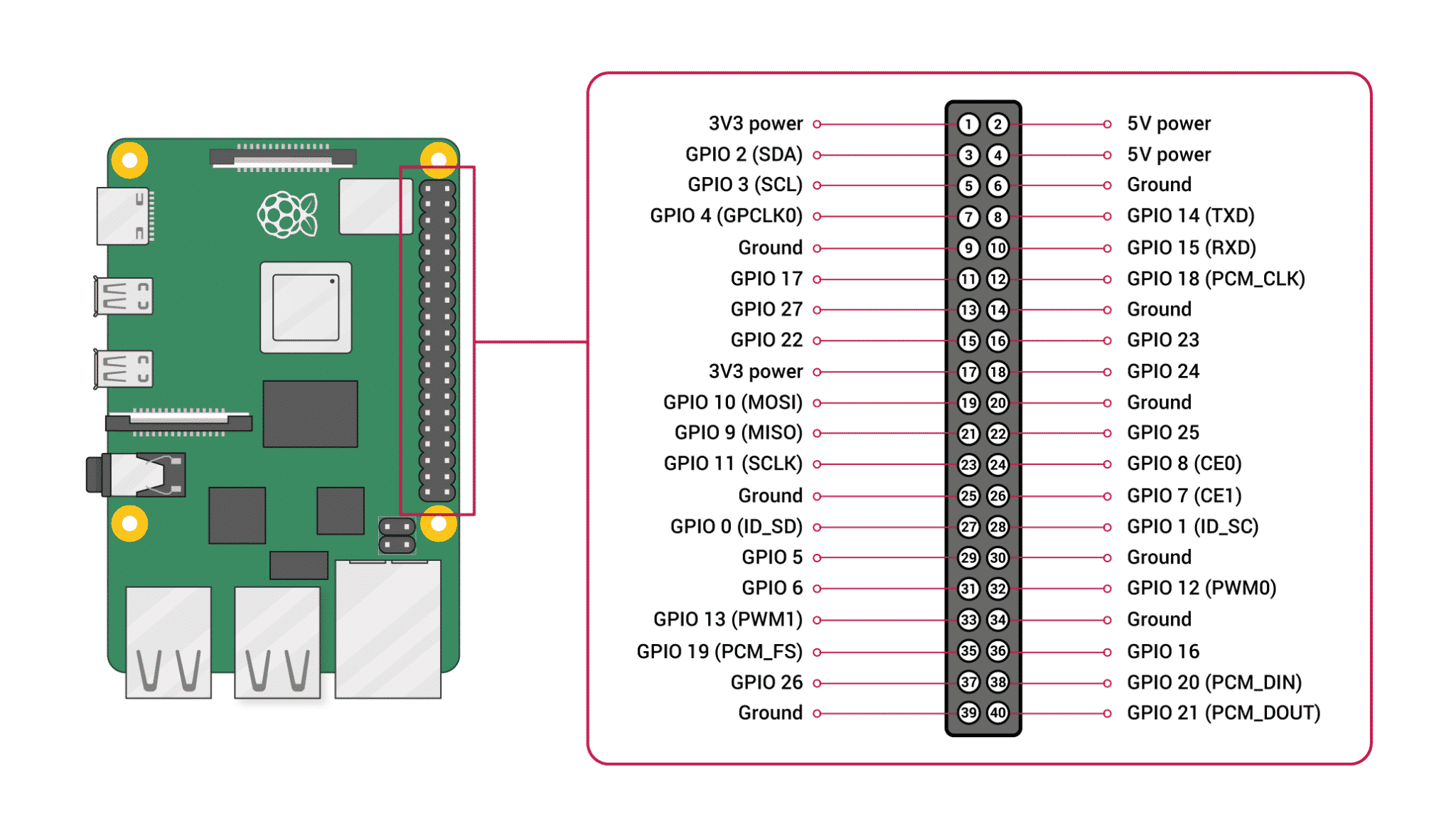
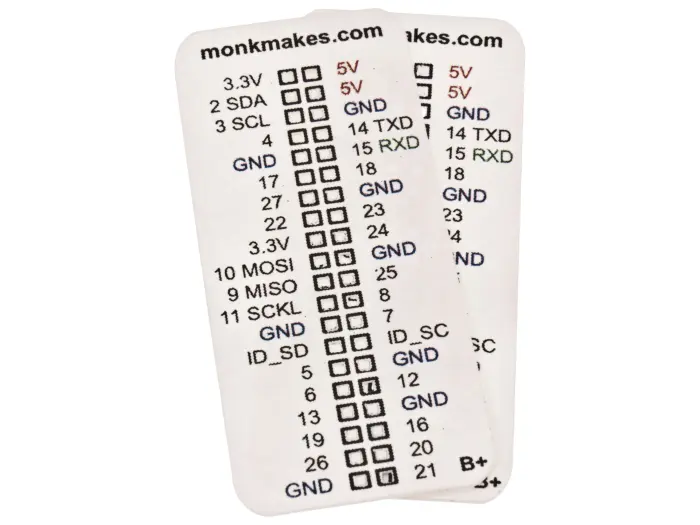
  1. GPIO Pins: It has 40 General Purpose Input/Output pins that allow it to interact directly with hardware like sensors and motors.
  2. Affordability: It provides a full computer experience at a fraction of the cost of a laptop.
  3. Low Power Consumption: It can run 24/7 (as a server or ad-blocker) while consuming very little electricity.
  4. Size: Its compact, credit-card size makes it ideal for embedding into small gadgets like robots or smart mirrors.

Question-2 Comparison Table: Raspberry Pi 500 vs. Standard Laptop

FeatureRaspberry Pi 500Standard Laptop
DesignKeyboard-integrated computerAll-in-one portable device
DisplayNeeds external monitor/TVBuilt-in screen
Power SourceConstant power supply (No battery)Built-in rechargeable battery
Hardware ControlFeatures 40 GPIO pins for DIYNo direct hardware control pins
ArchitectureARM-based (Cortex-A76)x86-based (Intel/AMD)
Best UsageLearning, Coding, Hardware ProjectsBusiness, Gaming, Travel

Question-3 Why is Scratch and Another free project considered a great tool for beginners on Raspberry Pi?

Answer: Scratch is used because:

  1. Visual Learning: It uses a drag-and-drop interface, making coding accessible to everyone without worrying about complex syntax.
  2. Hardware Interaction: It allows users to control physical components (like LEDs and sensors) via GPIO pins using simple visual blocks.
  3. Foundation Building: It teaches fundamental logic, loops, and variables, which are essential for moving on to professional languages like Python.

Question-4 What makes the Raspberry Pi Zero 2 W different from a standard Raspberry Pi 4?

Answer: The Zero 2 W is designed for portability and low power consumption. While it is less powerful than the Pi 4 and has less RAM (512MB vs up to 8GB), its tiny form factor and low cost make it ideal for embedded IoT projects.

FeatureDetails
ProcessorQuad-core 64-bit Arm Cortex-A53 @ 1GHz
Wireless2.4GHz IEEE 802.11b/g/n wireless LAN
PortsMini HDMI, Micro-USB (Power & OTG), microSD
CameraCSI-2 connector for camera modules

Question-4 Comparison: Industry vs. Home Usage of PI

Usage CategoryIndustry (Industrial)Home (Domestic)
Primary GoalEfficiency, Monitoring & AutomationEntertainment, Security & Convenience
Model UsedCompute Module 4 / Industrial CasesRaspberry Pi 4, 5, or Zero 2 W
EnvironmentHarsh (Heat, Dust, 24/7 run)Controlled (Standard Room Temperature)
SoftwareCustom PLC software, MQTT, Node-REDHome Assistant, Pi-hole, Kodi
Cost FocusScalability and ReliabilityAffordability and Ease of Use

Question-5 Can I use a Raspberry Pi Pico 2 W instead of a Raspberry Pi 4 for my project?

Answer: No, they serve different purposes.

  • Use Raspberry Pi 4 if you need a full operating system, high processing power, and multiple USB/HDMI ports.
  • Use Pico 2 W if you need a tiny, low-power, and affordable device for specific IoT tasks like reading sensors or controlling LEDs wirelessly.
FeaturePico 2 WRaspberry Pi 4
CategoryMicrocontrollerFull Computer
Power ConsumptionExtremely LowHigh
Boot TimeInstant (Milliseconds)Slow (Seconds)
Ideal ForIoT Sensor NodesMedia Centers, Servers
Need operating systemNo OS,directly codeHave Os

Question-6: Which is better: Raspberry Pi 4 or ESP32?

FeatureESP32Raspberry Pi 4
Power EfficiencyConsumes very little power; has deep-sleep modes.High power consumption; needs 5V/3A supply.
BootingInstant-on (Starts in milliseconds).Needs time to load an Operating System.
PriceAffordable ($5 - $8).More expensive ($45+).
ConnectivityBuilt-in WiFi/Bluetooth (Low Power).Full range of ports (USB, HDMI, Ethernet).
UseIoT, Sensors, AutomationServers, Desktop, AI

Question-7 What makes a device “Embedded”?

Answer: A device is considered embedded when it is integrated into a larger system to perform a single specialized task. Key characteristics include:

  • Efficiency: Optimized for its specific job.
  • Reliability: Designed to run 24/7 without crashing.
  • Real-time: Often responds instantly to physical sensors.

Comparison Table

AspectGeneral ComputerEmbedded System
GoalFlexibility (Many apps)Efficiency (One task)
Form FactorDesktop / LaptopIntegrated Chip ( Like washing machine, smart watch )
Boot SpeedSlow (Loading OS)Instant-on

Question-8 About the Raspberry Pi Foundation

Core Mission: “To put the power of computing and digital making into the hands of people all over the world.”

Major Initiatives:

  • Code Club & CoderDojo: Millions of young people learn to code in these free, volunteer-led clubs.
  • Coolest Projects: A world-leading tech showcase for young innovators.
  • Free Resources: Providing open-source learning materials for Python, Scratch, and Hardware Projects.

Question-9 Is the Raspberry Pi Foundation just a hardware company like raspberry pi-4?

Answer: No. While they design famous hardware, their primary goal is Education. The profits from hardware sales go directly back into funding global educational programs.

Question-9 Forums.raspberrypi.com

Answer: The Raspberry Pi Forums is the best place. It has a famous sticky thread called “The Boot Problem Sticky” which covers 99% of common startup issues.

Forum Sections:

  • General Discussion: For news and general topics.
  • Troubleshooting: Specialized help for hardware and software bugs.
  • Projects: A place to show off what you have built.
  • Education: For teachers and students using Pi in classrooms.

Pro Tip: Before asking a question, always use the Search bar. Most likely, someone else already solved the same problem!

Along the way, I was reminded that:

  • The best learning often happens when you connect theory to practice
  • Kids are naturally curious about technology and eager to explore
  • A simple “What if we try this?” can become an amazing shared experience

The Technical Implementation

The app we created features:

  • Visual Tree Representation: Combinations displayed as growing trees with colorful nodes
  • Real-time Pattern Visualization: Dynamic updates as parameters change
  • Multilingual Support: Available in English, French, Spanish, and Italian
  • Interactive Controls: Easy-to-use interface for exploring different combinations
  • Educational Focus: Designed specifically for learning mathematical concepts

Key Insights from This Experience

1. The Power of Visual Learning

Converting abstract mathematical concepts into visual representations made the learning process much more intuitive. Vicente could immediately see patterns and relationships that would have been difficult to grasp from equations alone.

2. Technology as an Educational Tool

This experience reinforced my belief that technology, when thoughtfully applied, can be a powerful educational tool. The key is making it accessible and engaging rather than overwhelming.

3. The Importance of Play in Learning

The moment Vicente said “It’s like a game!” was a perfect reminder that learning should be enjoyable. When children are having fun, they’re more likely to retain information and develop a genuine interest in the subject.

The Multilingual Approach

One of my favorite features of the app is its multilingual support. We wanted Vicente—and any child—to be able to explore combinations in English, French, Spanish, or Italian. Making learning accessible and inclusive is a win for everyone!

This feature was particularly important to us as a family navigating multiple cultures and languages in our daily lives.

Looking Forward

This project has inspired me to explore more ways to:

  • Bridge the gap between traditional education and modern technology
  • Create interactive learning tools for various subjects
  • Share these experiences with other parents and educators
  • Develop more educational applications that make learning fun

The App

You can explore the app we created here:

🚀 Interactive Combinations App

Conclusion

Now, with a few emojis and some code, we’ve made math visual and intuitive. It’s amazing to see a concept from a book become an app that makes learning exciting—and memorable!

This father-son coding adventure has taught me that the best educational experiences often come from combining traditional learning with modern technology. When we make learning interactive, visual, and fun, we open up new possibilities for understanding and engagement.

The journey from math book to app has been more than just a coding project—it’s been a beautiful reminder of how technology can bring families together while making education more accessible and enjoyable for everyone involved.